Subagents
Let the agent split big work across other agents, then watch, stop and review what each one does.
When a task is big, the agent in your Session can hand parts of it to subagents: other agents that each take one piece, such as a review, a search or a fix in another package, and work at the same time on the same Machine. Each one reports back to the agent that started it, so the work finishes sooner and the results come together in your Session.
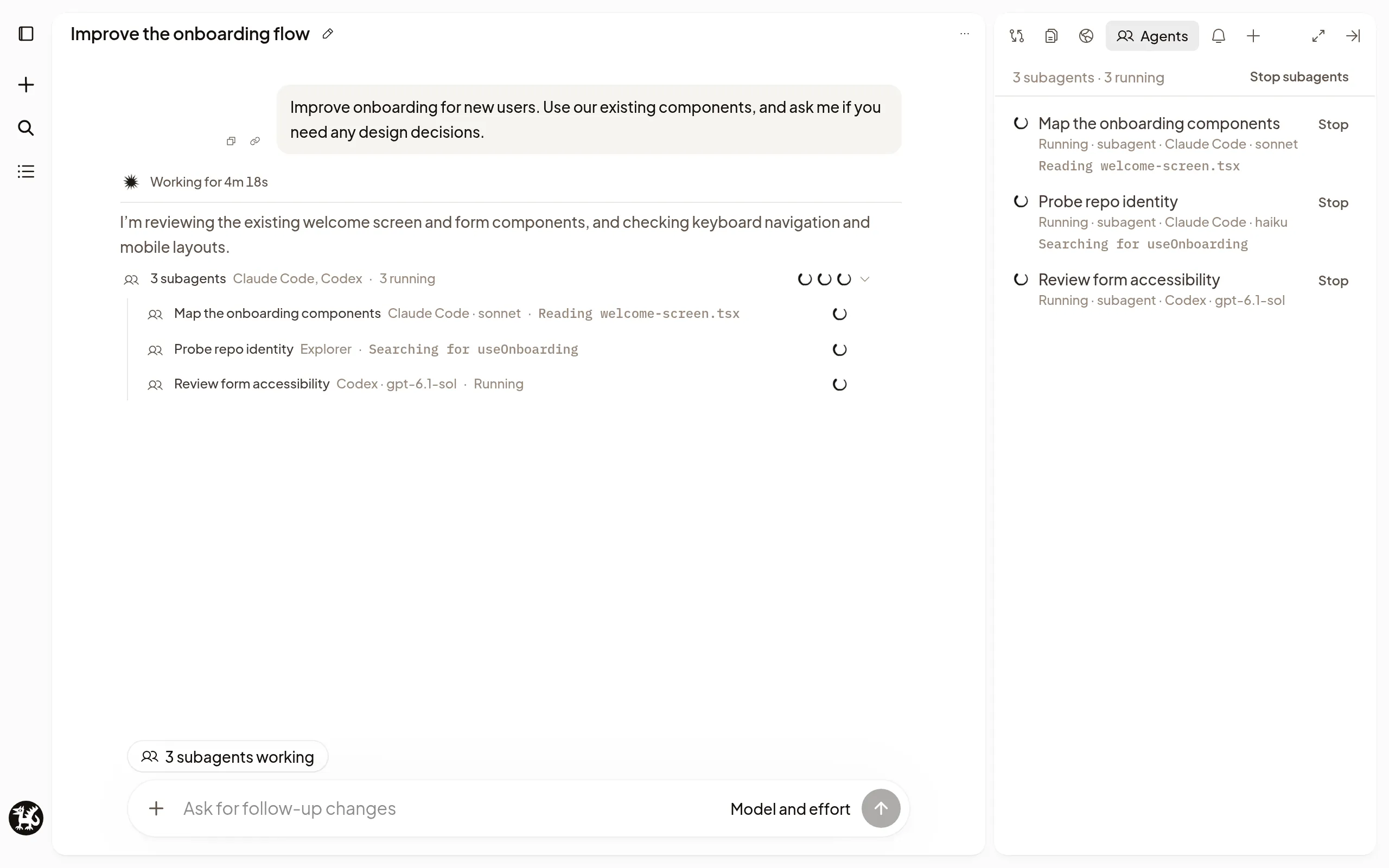
Split up the work
In Codex and Claude Code Sessions, the agent starts subagents on its own when a task suits it, and you can ask it to.
The agent can choose each subagent’s model and effort, and even a different coding agent, such as a Codex subagent in a Claude Code Session, or you can say which you want.
A subagent’s permission limit comes from the mode used to start the parent agent’s current Turn. Changing the Session’s mode during that Turn doesn’t change which subagents it can start or the permissions of subagents already running. Pi runs without approval checks, so Pi subagents require Full access on the Codex or Claude Code parent Session. Auto Sessions can use Codex and Claude Code subagents. Pi Sessions cannot start subagents or independent Sessions yet.
A subagent starts from what the agent tells it, not your whole conversation, so ask the agent to pass along anything it needs. When the agent and the subagent both use Claude Code, the agent can instead give the subagent a copy of the conversation so far, unless the conversation has images, documents or other attachments. Use subagents when a piece of work has a clear result and can go ahead on its own. Keep work with one agent when the steps depend on each other or change the same files.
The agent keeps working while its subagents run and picks up each answer when it comes back. It can also wait for a subagent’s answer before going on.
Watch them work
- Above the composer, a chip such as 2 subagents working shows while any run. Select it to open Agents, the list of every subagent.
- In the transcript, each subagent is a row showing what it’s doing, then Done, Failed or Stopped. Its answer comes back to the agent as a Result from row. When the agent starts two or more subagents at once, they share one row such as 3 subagents · 2 running · 1 done. Once all of them finish, it folds to that row, naming any that failed; select it to show or hide their rows.
- In the sidebar, choose Show subagents on a Session’s row to list its subagents under it.
Select a subagent to read its live transcript beside the Session; on a phone it opens in a sheet. Full view opens it on its own page.
You can watch a subagent but not message it. To redirect it or give it more work, tell the agent that started it. If a subagent stops to ask for your approval or a choice, its row and the Session show Needs you. Open the subagent and answer at its request card.
Stop subagents
- Stop on a subagent stops that one.
- Stop subagents in Agents stops all of them and leaves the main agent working.
- Stop on the main agent stops the agent, not necessarily its subagents. Use Stop subagents to end all subagent work.
Stopping doesn’t undo a subagent’s changes. Archiving your Session archives its subagents too and stops any still running.
Review their work
The agent reads each subagent’s answer and brings the results together for you. To see how a subagent got there, open it and read its transcript.
Subagents edit the same files as the agent unless the agent gives one its own checkout, so their changes show up with the rest in Review changes. A subagent with its own checkout keeps its edits on its own branch; choose that checkout in Changes to review it.
Work across your Sessions
The agent can also read other Sessions and message ones in the same Project, so one Session can pick up work another started, or two Sessions can stay in step. To hand independent work to a new Session on its own Machine, see Agent-started Sessions.
- It can read any Session its Session’s owner can open in the organization, including Sessions shared with them by name and archived ones. It finds the ones in this Project itself; for a Session in another Project, paste its link into your message. Your transcript shows Read and the Session’s name. Reading doesn’t wake that Session’s Machine.
- A message reaches the other Session’s agent with this Session named as the sender, and the agent can wait for a reply. Your transcript shows Messaged and, when the reply comes, Message from.
- A message can guide the other agent, but it can’t grant permissions or approve anything for you. Archived Sessions and other agents’ subagents can be read but not messaged.
If a subagent doesn’t finish
-
Failed can mean the subagent’s instructions never reached it. The agent that sent them receives the failure and its reason, including when it sent more work to a subagent that had already finished. Open the subagent to read the failure.
-
Paused: agent message limit reached: agents took many steps in a row without you. Send a message in the Session to let them continue. See also CI follow-ups.
-
Not delivered: Session archived: the Session was archived before the subagent finished. Open the subagent to read its result there.
-
Still running: Stop failed: select Stop again.
-
No Codex account is connected. (or another agent) under a subagent: it couldn’t start because you have no account for its coding agent. Use the button shown, such as Connect Codex. The subagent doesn’t start again by itself; the agent that started it already knows why it failed.
-
The agent can’t start another subagent: Polaris runs up to 8 of the subagents it starts at once by default. Stop one, or ask an organization admin to change Running subagents per Workspace in Settings → General → Agents. Subagents the agent runs inside its own process don’t count.