Report a problem
Have the agent draft a report about Polaris, then review it and send it to the Polaris team.
When something in Polaris breaks or is missing, tell the agent you’re working with. It drafts a report from your words and what it was doing, so the Polaris team gets the details they need to fix it. Nothing is sent until you review it.
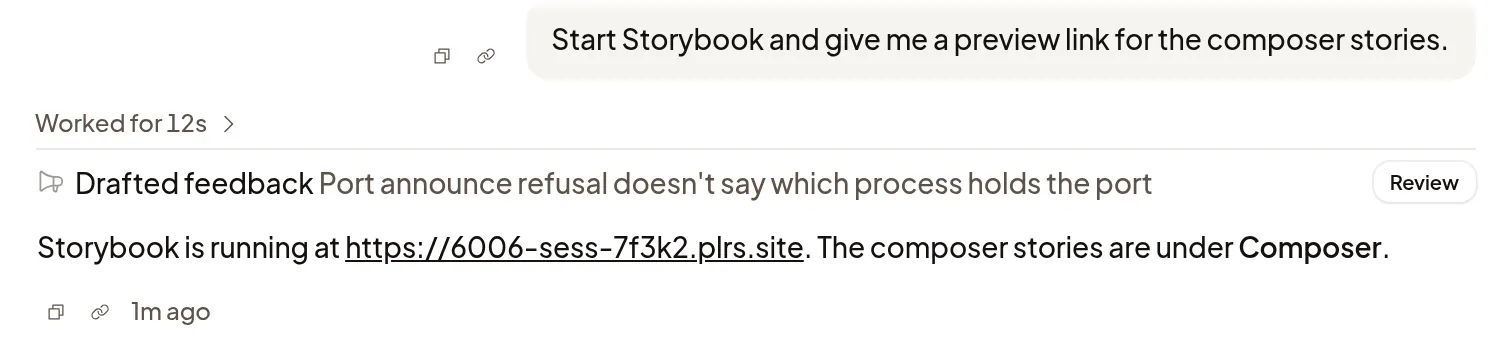
Report a problem
In any Session, tell the agent what went wrong or what you’d like Polaris to do.
The agent drafts a report and tells you it’s waiting in the Session. It also drafts one without being asked when a Polaris tool fails, when Polaris can’t do something you asked for, or when you’re frustrated with Polaris. It never reports on how it did the work itself, such as a wrong answer or a change you didn’t want.
Review and send it
- Find Drafted feedback in the transcript and select Review.
- Read the title and description. Edit either to change or remove anything you don’t want to share.
- Select Send to Polaris, or Discard.
The row then reads Sent to Polaris or Discarded. Only the Session’s owner can send or discard its reports; others can select View.
What Polaris receives
- The title and description as you sent them. If you edited them, the agent’s wording isn’t kept.
- Details from the agent that the review doesn’t show: what you said, how to reproduce the problem, evidence such as IDs and timestamps, and notes on what it was doing.
- The Session, Machine and organization it came from, the agent and model, and the versions of Polaris software on the Machine. Your transcript isn’t attached.
The agent is asked to leave out secrets, people’s names and customer content, and Polaris hides known secrets before it stores a report. If a draft might still contain something private, discard it. Sent reports stay with the Polaris team after you delete the Machine; drafts and discarded reports are deleted with it.
To stop agents drafting reports in your Sessions, turn off Feedback reports in Settings → General.
Reach the Polaris team
The in-app form is how you reach the Polaris team:
- Contact support on an error message sends your description together with the error’s details.
- Report a bug works anywhere: select the bug icon beside the gear at the bottom of the sidebar, or open Settings → General. Describe what happened and select Send report. Polaris adds which part of the app you were in.
- If Polaris won’t load at all, email andreas@plrs.sh.
Troubleshooting lists common problems and their fixes.
If a report won’t send
- Couldn’t send this report: select Send to Polaris again. Your edits stay.
- You can’t send or discard this report from here: only the Session’s owner can send it. Ask them, or use Report a bug.
- This Session was deleted: its reports can’t be sent. Use Report a bug instead.
- Feedback reports is off: agents can’t draft reports in your Sessions. Turn it on in Settings → General, or use Report a bug.