Agent-started Sessions
Let the agent hand independent work to a new Session on its own Machine, which you can talk to directly.
The agent can start a separate Session for independent work: a new conversation on its own Machine in the same Project, which you open and steer like any Session you started. The agent starts one when you want a side task as its own conversation, whether you ask in the Session or your agent instructions say so. Other work it hands off, such as research, reviews or parallel tasks it brings back together, runs as subagents under your Session, or goes to a Session you already have.
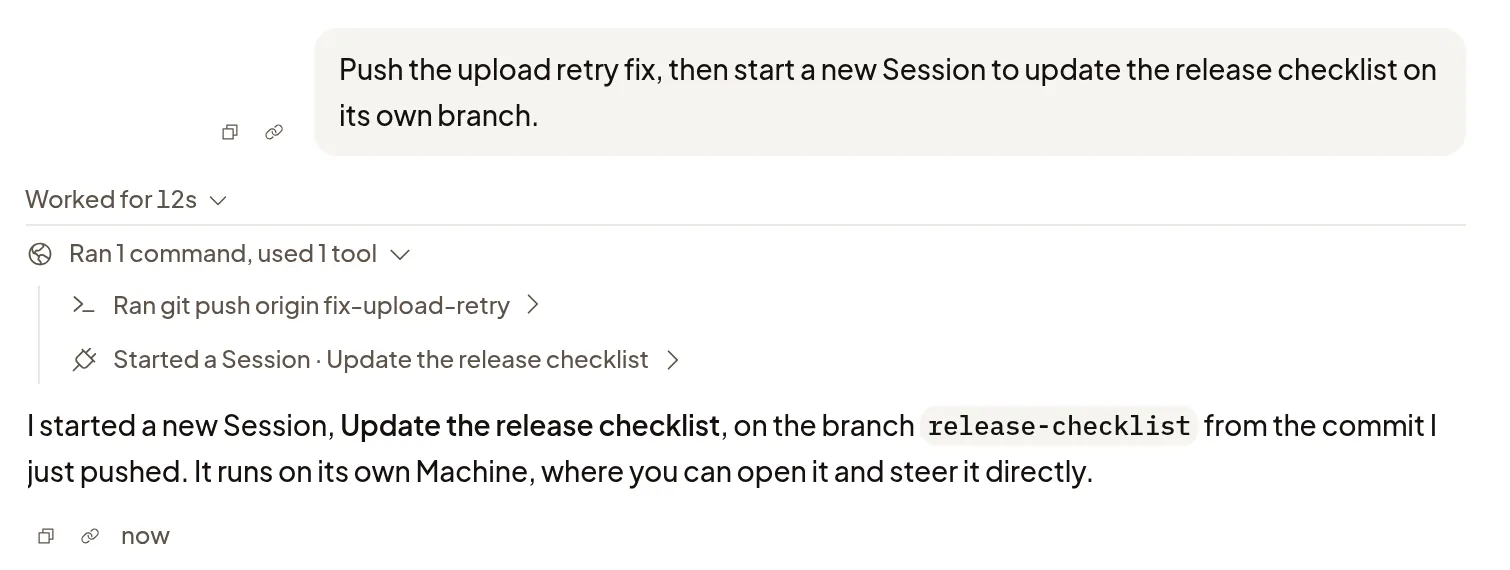
Start one
Ask for a new Session in your message. The agent writes the new Session’s brief and pushes its starting code, and Polaris starts a new Machine from that exact commit on a fresh branch. Uncommitted changes aren’t copied. To choose the branch name, say it; it must not already exist.
The new Session starts from the brief, not from your conversation. It uses the coding agent, model and effort of the Turn that started it, and its permissions can’t exceed that Turn’s.
Work in both Sessions
- Open the new Session and type in its composer to steer it directly. The original agent keeps working in the meantime.
- When the new Session’s first task ends, its result goes back to the original agent once. Later Turns in the new Session don’t send more.
- If you archive the original Session, the result stays with the new one.
- Press Stop on the main agent in the original Session to cancel its pending result without stopping the new Session.
- Stop subagents in the original Session doesn’t stop the new Session; stop its agent from the new Session. Archiving or deleting the original keeps the new Session and its Machine.
An agent in a Session started this way can’t start another one. Start further independent work from a Session you started yourself.
Daily limit
Agents can start 10 Sessions per Organization each day, and the count resets at midnight UTC. Deleting a Session doesn’t give its place back. These Sessions don’t count toward the running subagent limit.
Organization admins can change Agent-started sessions per day, or choose No limit, in Settings → General → Agents. Changing the limit doesn’t stop Sessions already running.
If it doesn’t work
- The starting commit isn’t pushed, or the branch already exists: the new Session doesn’t start. Have the agent push the commit or pick a new branch, then try again.
- The daily limit is reached: wait for the reset at midnight UTC, or ask an Organization admin to raise the limit.