Pull requests and CI
Follow the Session's pull requests, and have the agent come back on its own when CI finishes or the pull request changes.
Polaris collects the pull requests a Session works on and shows their live status, checks and reviews. The agent can wait for CI, or you can turn on Watch PR, and the agent comes back on its own when checks finish or the pull request changes. The Machine can sleep in the meantime.
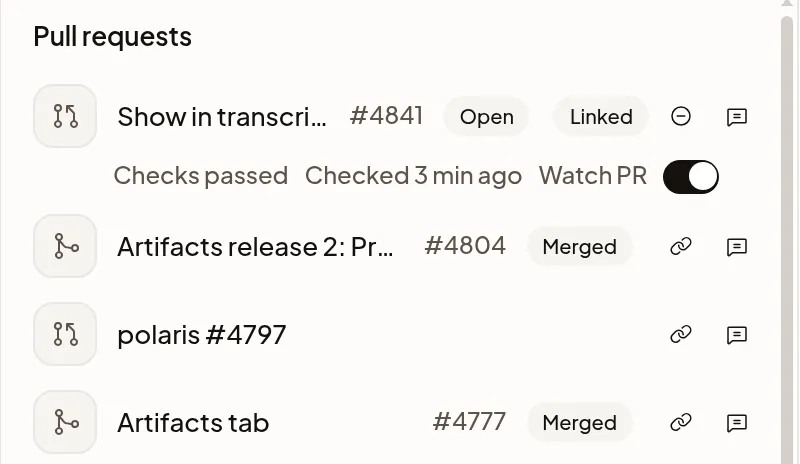
Find your Session’s pull requests
The Session’s Artifacts tab lists pull requests it opened, merged, reviewed, commented on, closed, reopened or linked. It includes pull requests its subagents worked on. Reading or mentioning a pull request puts it under Mentioned; choose Add to list to keep it with the Session’s work.
Open and draft pull requests appear first, with those needing attention at the top. Expand Merged & closed to see completed work. The summary counts each status; Status unavailable keeps a pull request visible when Polaris cannot read its current status.
The pull request linked to the Session says Linked and has the Watch PR switch. Each row shows checks, review status and mergeability separately. Checked says when Polaris last looked. The list stays available while the Machine sleeps.
Choose Remove from list to hide a pull request without closing it on GitHub. Removing the linked pull request also unlinks it and stops watching. Undo adds it back; watching stays off until you turn it on again. New activity on a removed pull request does not add it back automatically.
A link to a GitHub pull request in the transcript shows the pull request’s state. Hover over the link, or move focus to it with the keyboard, to preview the pull request’s title, author, age and size. The preview shows only pull requests your GitHub account can see.
To link a different pull request, choose Link to this Session on its row; Unlink from this Session removes the link and keeps the pull request in the list. Only the Session’s owner can change it. You can also have the agent change the link. If your Machine doesn’t support that, use the row’s controls. Linking a pull request doesn’t start a CI notification.
Wait for CI
The agent can arrange a CI notification after pushing a pull request, then finish its Turn so the Machine can sleep. Polaris sends the result to the same Session, and the agent continues on its own. If the agent is busy, the result waits until it can continue. A subagent can arrange one for itself too; its result also waits while the limit for running subagents is reached. CI follow-ups count toward the agent step limit; at the limit, results wait until you send a message.
Each notification covers the checks observed for one commit. A new push needs a new notification. After an hour, Polaris stops waiting for checks and prepares the result it could observe, even if checks are still running or their result is unknown. That notification doesn’t report later results. Delivery can wait until the agent is ready or you send a message to release the step limit. A CI result doesn’t authorize a merge.
Watch your pull request
Turn on Watch PR on the linked pull request in Artifacts to bring the agent back when checks fail or all pass for its current commit, new review comments arrive, base-branch changes cause a merge conflict, or it is merged or closed. Watch PR is off by default. Only the Session’s owner can change it. The agent can also turn it on when you ask it to land or babysit the pull request; watching doesn’t authorize a merge.
When you turn it on, Polaris checks the current state. Checks that already failed or passed, or an existing conflict, bring the agent back once. Pending or unknown checks don’t. An already merged or closed PR sends one final follow-up and turns Watch PR off. Earlier review comments are not replayed.
Changes waiting together arrive as one follow-up. If the agent is busy, the follow-up waits. PR follow-ups count toward the agent step limit; at the limit, they wait until you send a message. A subagent’s follow-ups also wait while the limit for running subagents is reached. A sleeping Machine can wake for the follow-up.
Turn Watch PR off to stop future follow-ups. Stop, archiving the Session, unlinking its pull request, or linking a different one also turns it off and cancels waiting PR follow-ups.
Read a CI result or PR update
A CI result or a Watch PR follow-up shows in the transcript as one row from Polaris, not as a message from you. Polaris sends it to the agent, and the agent continues on its own.
- A CI result says how CI ended on the pull request, such as CI failed on web#3048 · 2 failing checks, CI passed on web#3048 or CI still running on web#3048 · stopped waiting after an hour. Select the row to see the failing checks with links to each check’s details, the commit, Open on GitHub for the pull request, and why it came: “The agent asked Polaris to tell it when CI finished on this commit.”
- A Watch PR follow-up says what changed, such as Watch PR update on web#3048 · Checks failed · 2 new comments. Select the row to see each change, a New comment link for each new comment, and Open on GitHub. Past 100 changes, the oldest new comments show only as a count, such as 3 more comments.
If it doesn’t work
If your Session stays unable to receive a PR or CI follow-up for an hour, Polaris ends that watch. Watch PR turns off; you can turn it on again. Time waiting for the agent step limit or running-subagent limit does not count.
- stopped waiting after an hour on a CI result: checks were still running, or Polaris couldn’t get a CI result. That CI notification won’t report later results. Ask the agent to check CI again.
- Couldn’t refresh on the linked pull request: Polaris can’t show its status right now. Checked still shows when it last looked.