Skills
Give agents skills from skills.sh or a GitHub repository, for a whole Project or only for you.
Skills teach agents a specific job, such as writing release notes or triaging a flaky test. Add them from skills.sh or from a GitHub repository, for everyone working in a Project or only for you, and agents get them without anyone copying files into a repository.
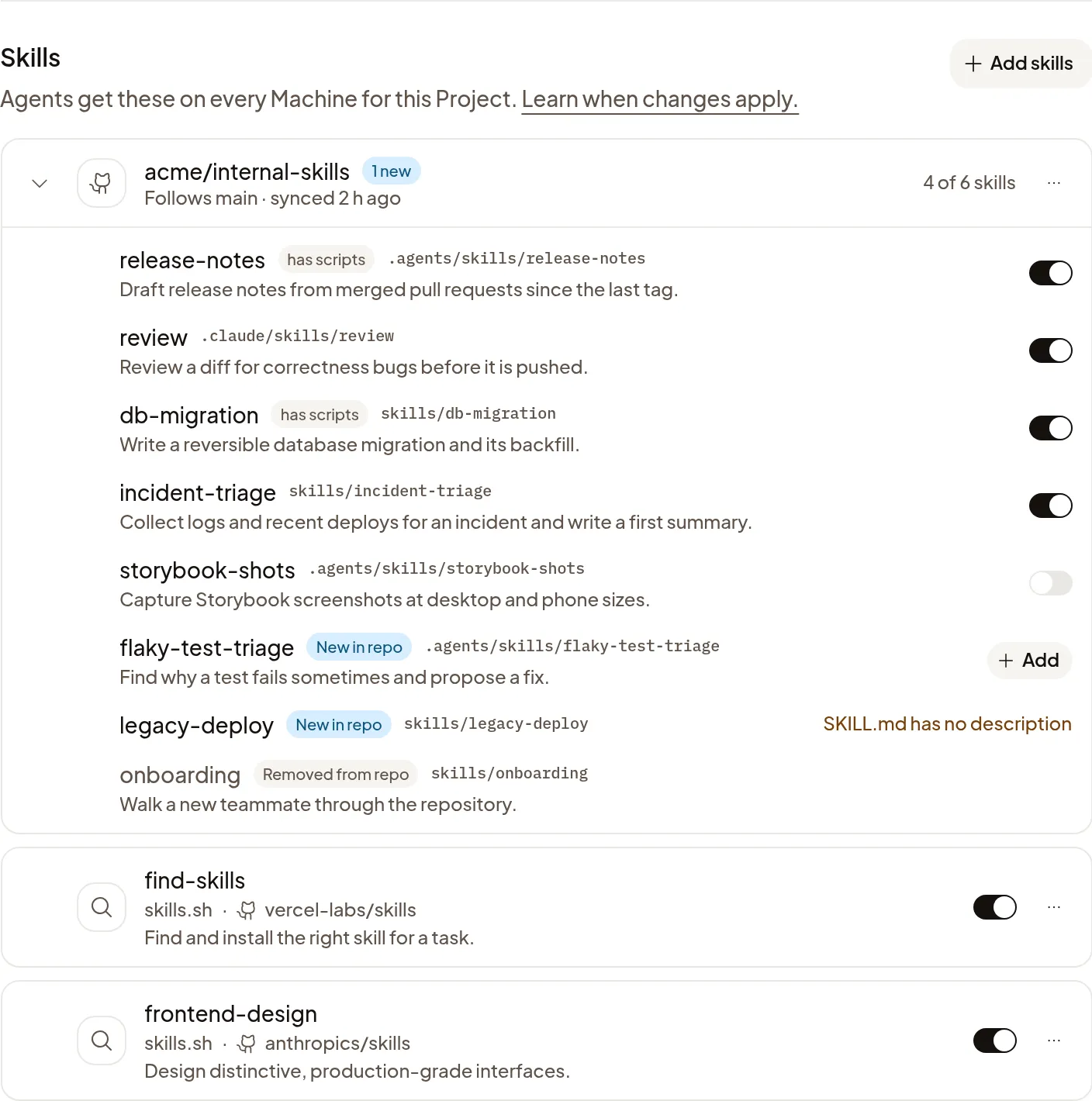
Add skills to a Project
- Open Settings → Projects, open the Project and go to Skills.
- Choose Add skills, then Discover or GitHub repository.
Agents get the Project’s skills on its Machines, though some Machines can’t receive them. Any member of the Project’s Organization can change them. Polaris’s own skills are always on and aren’t listed.
Discover skills
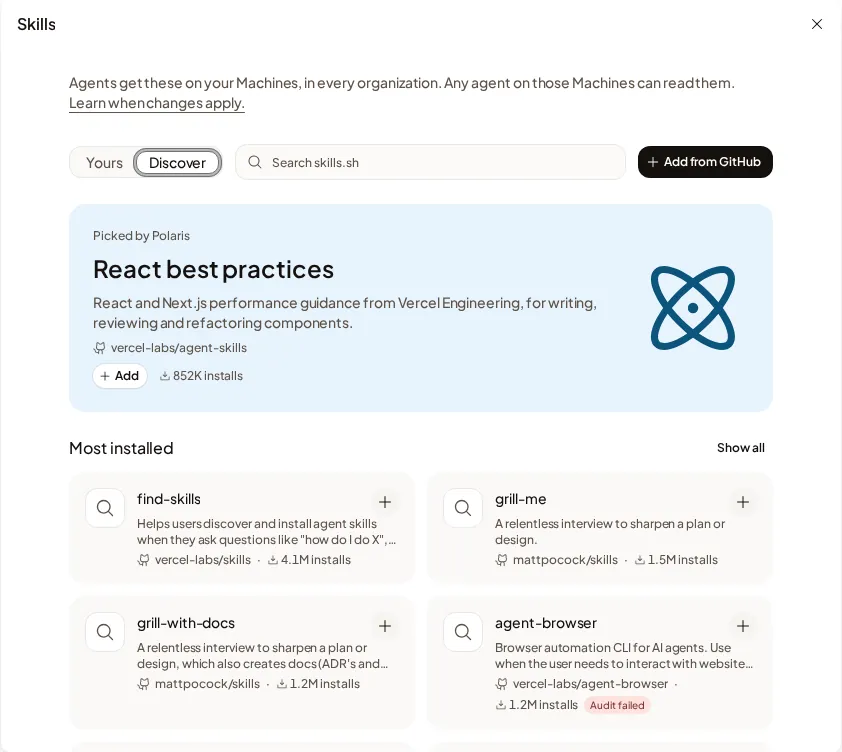
Browse the Polaris pick, Most installed, From the teams behind your tools or Categories. Enter at least two characters in Search skills.sh to find something specific. Choose Add or a card’s +; a checkmark means it is added. In a Project, Add puts the skill in that Project. On Your account → Skills, it adds the skill only for you. Audit failed means at least one skills.sh audit failed; other audit results have no badge.
Polaris keeps the version you added. To take a newer version, remove the skill and add it again. Choose Done to close the Project’s add panel after adding.
Add from a GitHub repository
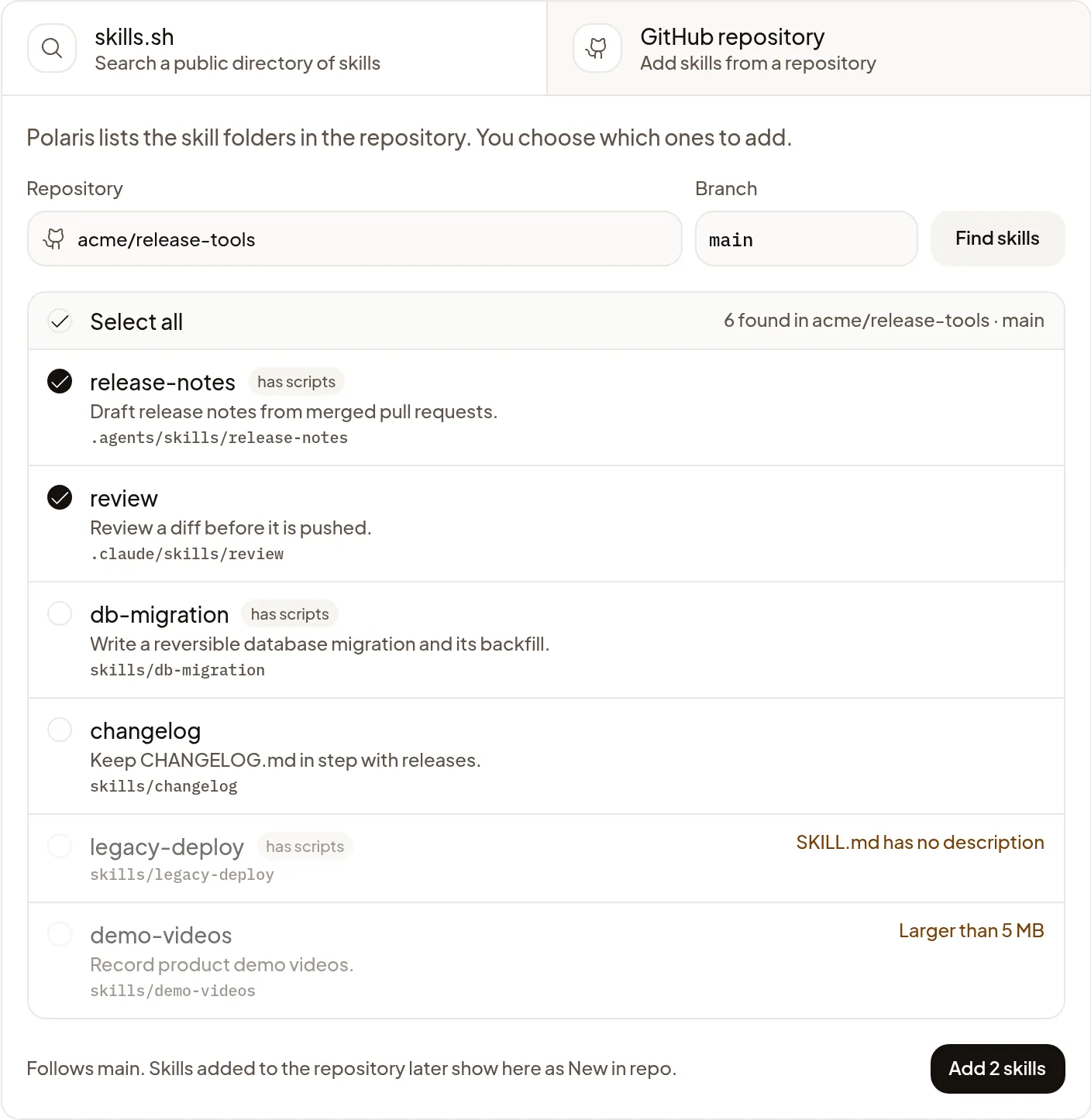
- Paste a GitHub URL in Repository, or search your Organization’s repositories. You can add any public repository, or a private one your Organization’s GitHub connection can read. Connect GitHub first if your Organization has no connection.
- Choose Find skills to list the skill folders on its default branch.
- Tick the ones you want and choose Add 2 skills, which counts what you ticked. A folder marked has scripts includes files the agent can run. A folder that can’t be added says why.
A repository URL such as https://github.com/example/skills lists its skills.
A URL ending in /tree/main/skills/release-notes ticks that folder if it contains
a skill. Polaris always follows the default branch, even if the URL names another.
Public repositories outside your Organization’s GitHub access update hourly. Repositories covered by its GitHub connection update when someone pushes. Agents that start afterwards get the new version. If a public repository becomes private or is deleted, Polaris keeps the last good versions of your added skills. A deleted skill folder shows Removed from repo, and agents stop getting it.
Folders you left unticked appear as New in repo. Choose Add to use one; Polaris never adds one for you. To change which skills you use, open the repository’s ⋯ menu and choose Choose skills…. To pause one skill, turn off its switch.
A skill can be up to 5 MB and 500 files, and a Project can have up to 50 skills.
Add skills for yourself
Open Settings → Your account → Skills. Yours lists your added skills; choose Discover to browse or Add from GitHub to pick a repository from any of your Organizations or paste a public repository’s URL. Agents get your skills on Machines you own, in every Organization you belong to, and any agent on those Machines can read them. You can have up to 50. A skill you added from an Organization’s repository is removed when you leave that Organization.
Use a skill
Type / in the composer to pick a skill, or let the
agent use one when it fits the task. Claude Code names Project skills
project:<name> and yours personal:<name>.
When changes apply
Agents that start after you add, update, turn off or remove a skill get the change. A Claude Code or Pi Session that’s already running keeps the skills it started with, so start a new Session from Start to use the change. Codex Sessions on a Machine share their skills: a running one picks up the change the next Turn.
If it doesn’t work
- Discover isn’t available right now. You can still search skills.sh.: choose Retry, or use Search skills.sh.
- The skill menu says Project and personal skills need a newer Machine: that Machine can’t receive them, and starting another Session on it doesn’t help. A new Machine gets them.
- Polaris can’t read a repository: check that it is public, or choose Manage GitHub access and give the Polaris GitHub App access.
- A folder shows a reason, such as SKILL.md has no description: fix the folder in the repository, then remove and add the repository again to import the corrected folder.
- A Project can have up to 50 skills: remove skills you no longer use, then add more.