---
title: Talk to the agent
description: Steer the agent while it works, queue the next task, answer its questions, or stop it.
---
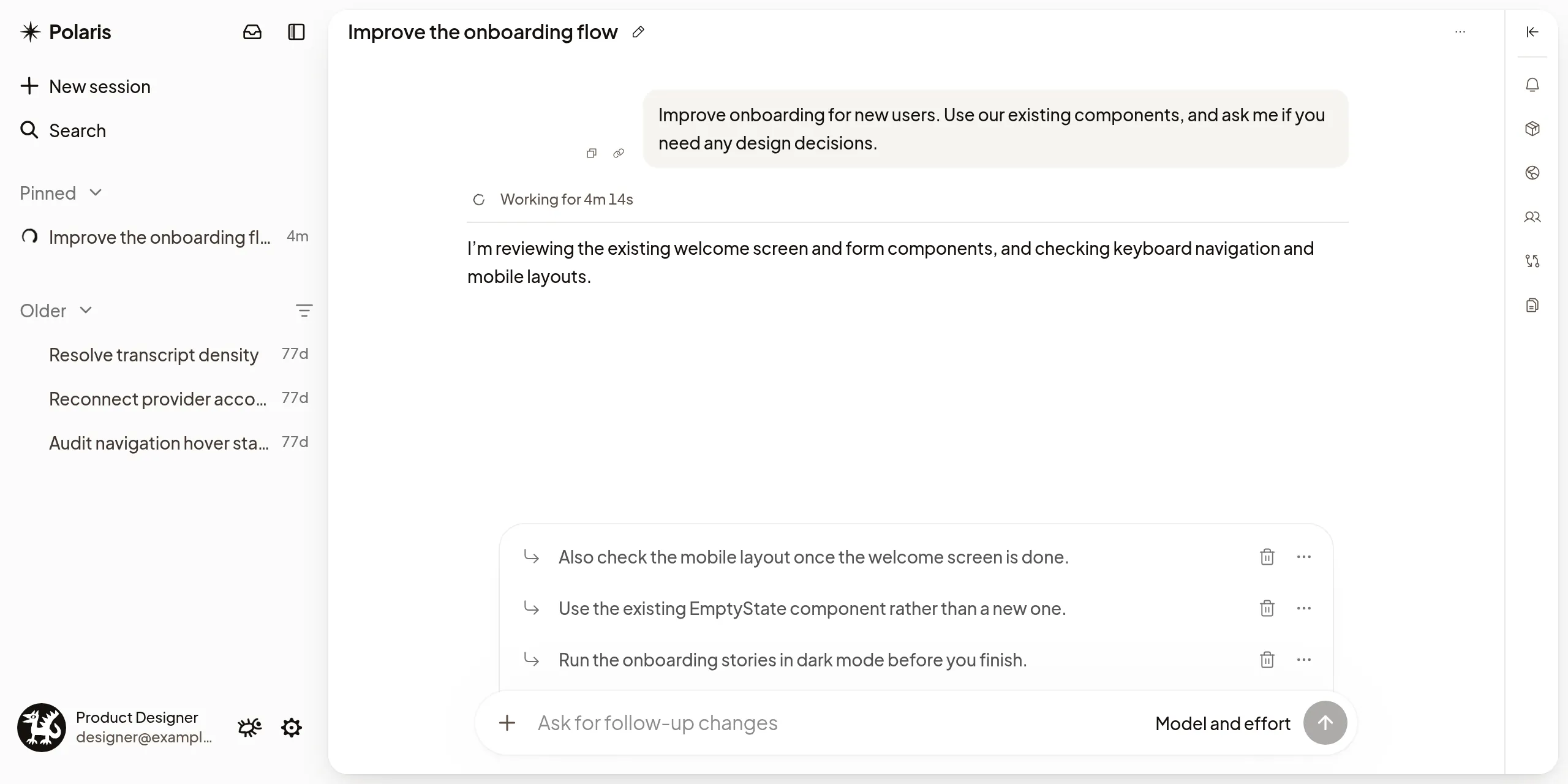
You talk to the agent from the composer at the bottom of a Session, and you
don't have to wait for it to finish. Add a detail it missed, change direction
mid-task, line up the next task, or stop it. To begin new work instead, see
[Start a Session](/docs/start-a-session). For what you can put in a message, such
as files, Sessions, skills and screenshots, see [The composer](/docs/composer).
## Send a message
Type your message and press Enter. If the agent is idle, it starts
working on it; if its Machine is asleep, your message wakes it.
## Follow what it does
The transcript shows each step as it happens: what the agent says, the commands
it runs and the files it changes. Expand a command to see its output. Open
[links the agent sends](/docs/previews#open-links-from-the-agent), or select a file
path to open the [file](/docs/files).
When a long conversation fills the agent's context, the agent compacts it: it
summarizes what came before and carries on from that summary. With Claude Code
and Codex, the transcript shows **Compacting context** while it happens, then
**Context compacted**, with how much context it freed when the agent reports it.
When the agent kept a summary, select **Context compacted** to read the summary
it continues from. To compact a long conversation yourself, see
[The composer](/docs/composer).
## Steer or queue while it works
While the agent works, a message you send does one of two things:
- **Steer**, the default, reaches the agent right away. It takes your message
into account without stopping. Use it to correct course or add a detail.
While the agent is compacting its context, your message waits until the
compaction finishes; see
[Send or remove a waiting message](#send-or-remove-a-waiting-message).
- **Queue** waits above the composer until the agent finishes, then goes as the
next task.
Press Ctrl+Enter (⌘+Enter on a Mac)
to do the other one once. To make Queue the default, set **Settings → General →
Follow-up behavior** to **Queue**. Until a queued message starts, you can send
it now with **Steer**, take it back with **Edit queued message**, or delete it
with **Remove from queue**.
## Send or remove a waiting message
A message you steer with while the agent compacts its context waits, and shows
**Sends after compaction** under it with Claude Code and Codex. Next to it:
- **Send now** stops the compaction, so the agent gets your message now. The
compaction then shows **Compaction stopped**.
- **Remove** means the agent never gets your message. It stays in the
transcript, dimmed, and shows **Removed**. You can't undo this.
What you see depends on the agent and who started the compaction:
- After you run `/compact`, Codex and Claude Code offer both.
- When the agent compacts on its own, Claude Code offers **Remove**. Codex
offers neither.
Only the person who sent the message sees these actions. If the agent already
has your message, **Remove** can't take it back, and the caption says **Too
late to remove. The agent still gets this message.**
Some Machines can't send or remove a waiting message. The caption then says
so, and your message still goes to the agent when the compaction ends.
**Stop agent** stops a compaction too, along with the agent's work.
## Stop the agent
When the composer is empty, the send button becomes **Stop agent**. Stopping
doesn't undo what the agent already did. Queued messages the agent hasn't
received come back into the composer, in order and ahead of anything you were
typing, so you can edit them or send them again. If they came back in another
window, select **Restore draft** to bring them here. Subagents keep running until
you stop them; see [Subagents](/docs/subagents).
## Answer the agent's questions
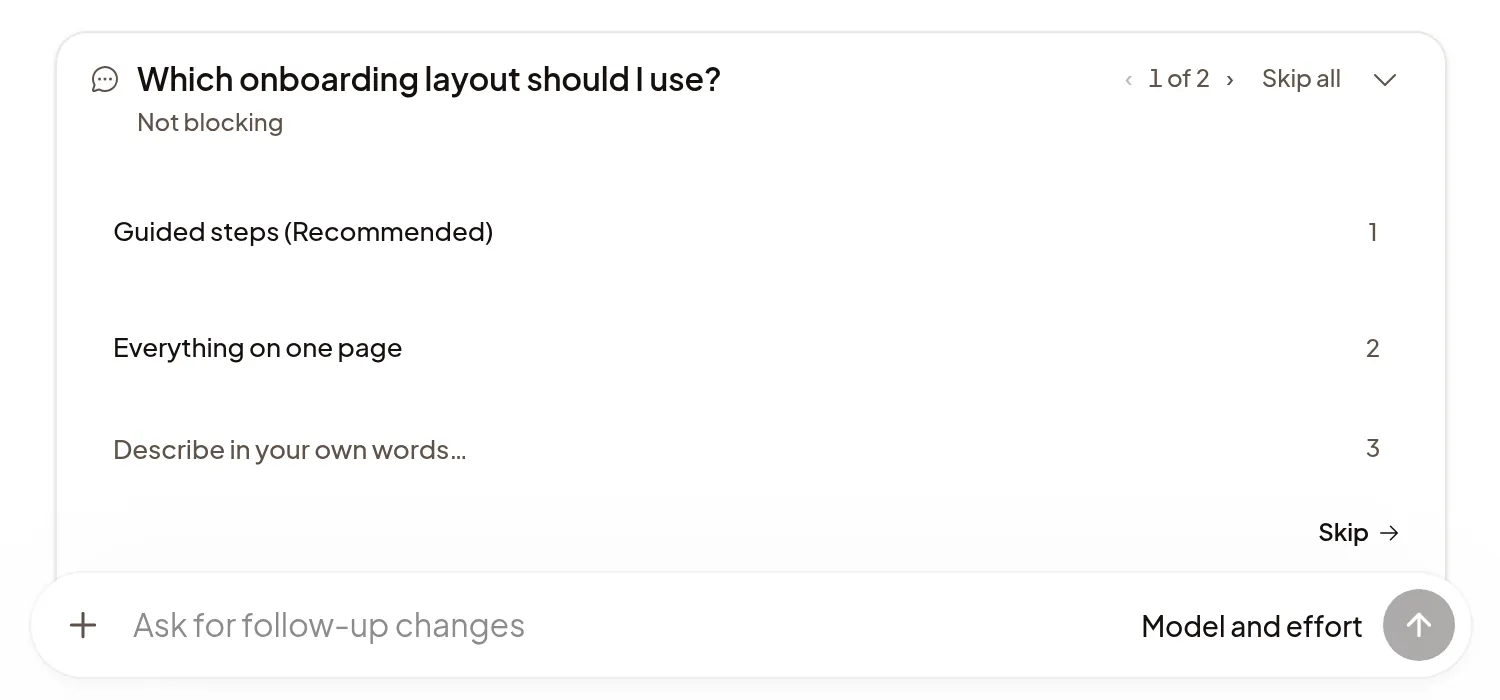
When the agent needs a decision, its question appears above the composer.
Choose an option or type an answer, or select **Skip** to let the agent use its
own judgment. While a question is **Not blocking**, the agent keeps working.
For a **Blocking** question it waits for you; if you don't answer in time, it
stops waiting, and your later answer still reaches it. A Session with an open
question shows **Needs you**; see [What needs you](/docs/what-needs-you).
## If it doesn't work
- **Not sent**, **Not confirmed** or **Not delivered** under your message: use
the action next to it, such as **Retry**. To drop a message that shows **Not
sent** or **Not confirmed**, choose **Remove**, or **Edit** to move it back
into the composer; **Undo** brings it back for a few seconds. Removing never
takes back a message the agent already has.
- **Agent isn't starting · Polaris is retrying**: you don't need to do
anything. If Polaris
[stops trying](/docs/troubleshooting#agent-isnt-starting--polaris-is-retrying),
your message shows **Not delivered**; select **Retry**.
- **Couldn't reach the Machine to stop. Try again.**: select **Stop agent**
again.
- For anything else, see [Troubleshooting](/docs/troubleshooting).