---
title: Review changes
description: Read the agent's diff, comment on lines and send your feedback to the agent.
---
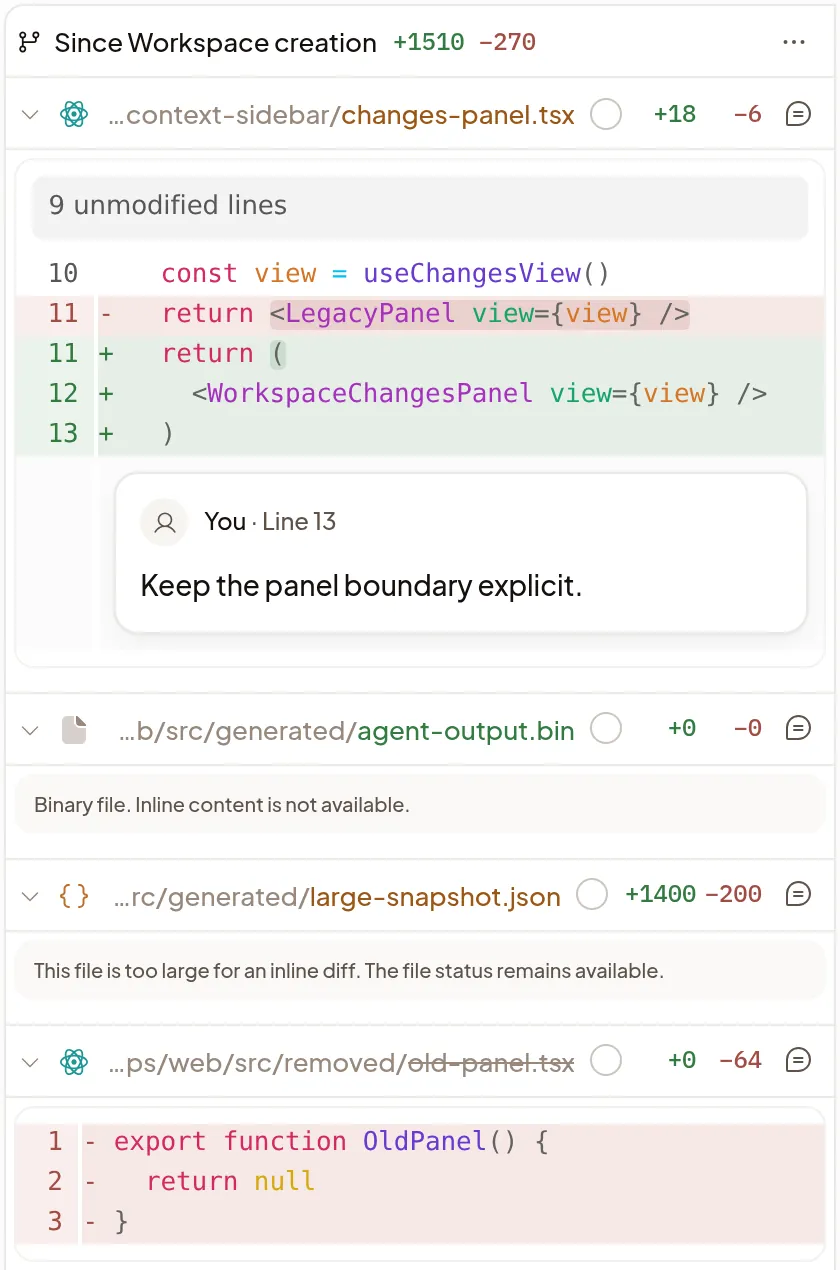
**Changes** shows everything the agent changed on its Machine as a diff, and
lets you comment on any line to tell it what to fix. Review the work here the
way you'd review a teammate's, before the agent opens a pull request.
## Read the diff
Select **Changes** in the Session's right sidebar, or press
Ctrl+Shift+G. You see each changed file with
its diff, compared with the repository's default branch, and the list follows
the agent's edits as it works.
- **Show files** opens a tree of the changed files, and **Filter files** finds
one by name.
- Select a file's header to collapse it, or **Open file** to see the whole file
in a tab; see [Files](/docs/files).
- **View options** (**⋯**) shows the diff **Unified** or **Split**, or
**Auto** to fit the panel's width. It also turns on **Wrap lines** and
**Hide whitespace**, and has **Collapse all** and **Expand all**. Your choices
follow your account to every device.
- Changes shows the Machine's checkout, so work from other Sessions on the same
Machine appears too.
## Comment and send it to the agent
1. Click a line number, or drag across several, to comment on those lines. For
a whole file, select **Comment on file** in its header.
2. Write under **Leave feedback…** and select **Add comment**. The composer
counts your comments, such as **2 code comments**; open the count to edit or
remove one.
3. Send a message. Your comments go with it, each with the code it quotes, and
you can send them without typing anything else.
Comments go only to this Session's agent, not to GitHub. Unsent comments stay
in this browser until you send them.
Changes doesn't commit, revert or push anything itself. Ask the agent for any
file or Git change.
## Choose what to compare
The label at the top, such as **Branch vs main**, names what you're comparing.
Select it to choose another:
- **Branch vs main:** everything this branch changes, committed or not. Use it
to review the whole piece of work.
- **Uncommitted:** only edits since the last commit.
- **Commit:** one commit at a time, to review the work step by step.
- **Since Workspace creation:** everything that changed since the Machine was
set up.
To compare with another branch, select **Choose target branch**. When a
[subagent](/docs/subagents) works in its own checkout, choose its branch under
**Checkout** to review its work.
## Mark files viewed
Tick **Viewed** in a file's header when you're done with it, and the file
collapses so you can move on. If the agent changes the file afterwards, the tick
clears and shows **Changed since viewed**, so you know to read it again.
## If it doesn't work
- **Machine is asleep:** Changes keeps showing the last diff it loaded. Select
**Wake machine** to see the latest.
- **Couldn't refresh changes:** select **Refresh changes**.
- **A line after the last file says some files aren't shown:** ask the agent
about those files.
- **The target or its history is unavailable:** choose another comparison, or
ask the agent to fetch the target branch.
- **This checkout was removed:** select **Show** with your branch name to go
back to the Session's own checkout.