---
title: Fork a Session
description: Copy a Session's conversation to ask about the work on the side, try another direction in the same files, or carry it on from a copy of the Machine.
---
Fork copies a Session's conversation into a new Session, so you can ask about
the work or take it in another direction without interrupting the agent. Open a
side chat for a question while the agent keeps going, or fork into a new
Session that works in the same files or on a copy of the Machine.
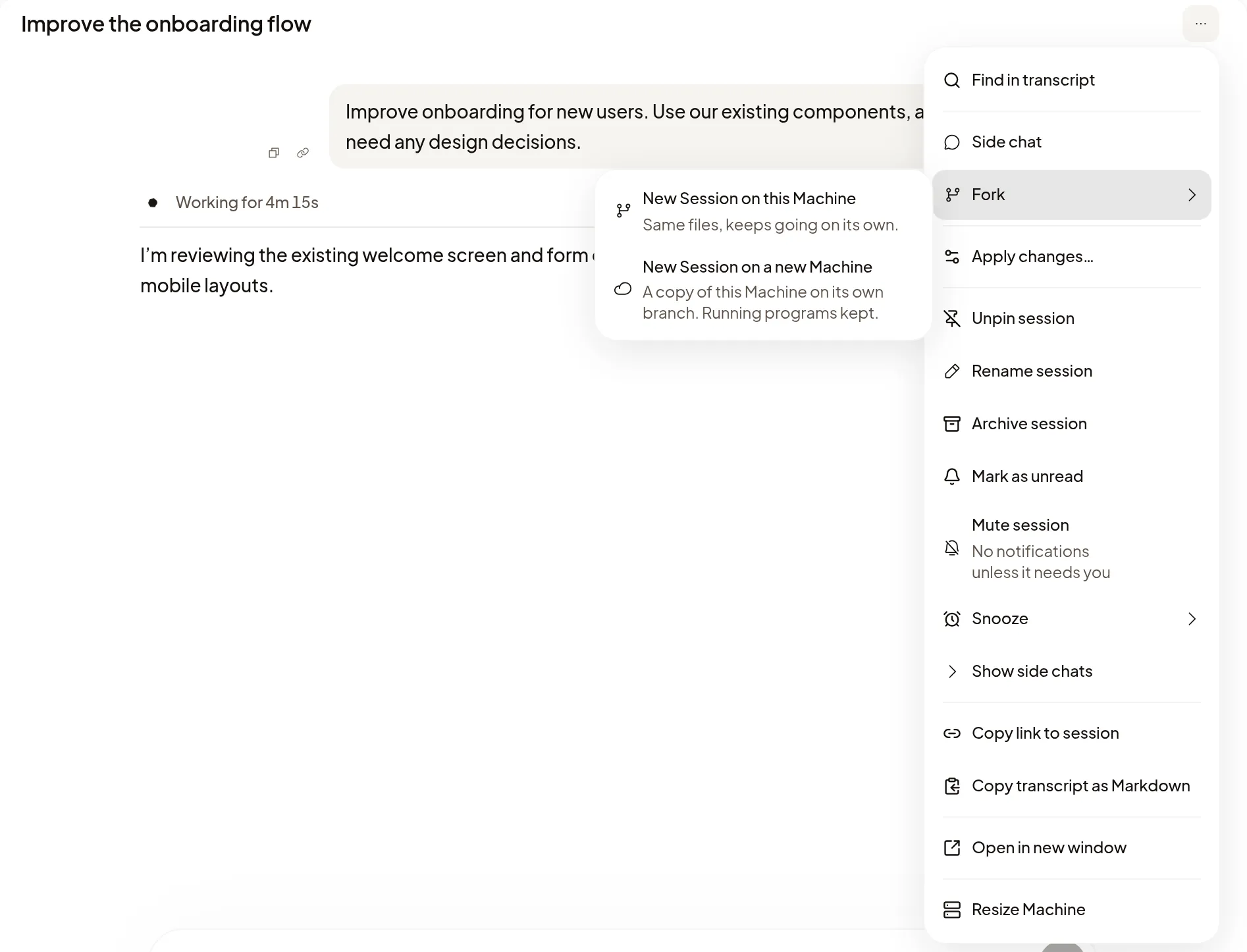
## Fork a Session
Open the Session's **⋯** menu at the top right and choose one:
- **Side chat**: ask on the side. It's archived with this Session.
- **Fork** → **New Session on this Machine**: the same files, and it keeps going
on its own.
- **Fork** → **New Session on a new Machine**: a copy of this Machine on its own
branch.
The agent's latest finished reply has a fork icon beside copy and link, with
the same two **New Session** choices. It stays on that reply while the agent
works on the next one, and if the next one fails or is stopped.
There are more ways to reach a side chat:
- **Side chat** at the end of the right sidebar opens the Session's most recent
side chat, or starts one if it has none. Its back arrow goes to the list of
side chats.
- **+** in the right sidebar's tab row, then **Side chat**, starts a new one.
- Cmd+; (Ctrl+; on Windows and Linux) starts a new one.
In the composer, `/side` opens a side chat and `/fork` a **New Session on this
Machine**. Text after the command becomes the new Session's first message. If
you leave before the fork opens, it waits in the new Session's composer for you
to send. These commands take plain text: with an attachment, a comment or an `@`
reference in the composer, your message goes to this Session instead. To include
those, open the fork first and add them there.
The fork gets the conversation up to the agent's latest finished reply, images
included; a reply still being written, or one that ended because the agent
failed or was stopped, isn't copied. You can't fork from an earlier message. The new Session's transcript starts empty, but its agent
already has the conversation, so your next message carries on from there. It
uses the same coding agent, and you can choose another model in it.
Forking wakes a sleeping Machine when it needs to. While it wakes, you see
**Waking this Session's Machine…**, and the fork opens once the Machine is
awake. **Stop waiting** stops the fork and keeps what you typed.
| | Side chat | New Session on this Machine | New Session on a new Machine |
| --- | --- | --- | --- |
| **Files** | The same Machine and files | The same Machine and files | A copy of the Machine, on a new branch |
| **Where it's listed** | **Agents** tab, and under its Session in the sidebar | Its own row in the sidebar | Its own row in the sidebar |
| **Archiving** | Archived with its Session | On its own | On its own |
| **Who can start it** | People who can drive the Session | People who can drive the Session | Anyone who can see the Session |
## Ask on the side
A side chat opens beside the transcript with its own composer. Ask about the
work so far while the agent keeps working. Nothing in a side chat goes into the
main Session, but it works in the same files, so a change it makes is a change
for the main Session too.
- A Session's side chats are listed under **Side chats** in its **Agents**
tab, where **Side chat** opens another. In the sidebar, choose **Show side
chats** on the Session's row to list them under it.
- A side chat is shared with the same people as its Session and follows any
later change to the Session's sharing. Each message shows who sent it. A
side chat runs on the Session owner's agent accounts, even when a teammate
who can drive the Session opens it.
- Archiving the Session archives its side chats and stops any that are
running. **Stop subagents** doesn't stop them.
- When a side question turns into work of its own, select **Keep as a
Session**. It gets its own row in the sidebar and is archived on its own, and
its note says **Was a side chat · Forked from** and the Session's name. It
keeps the sharing it had, and later changes to the original Session's sharing
no longer reach it.
A side chat can't have its own side chat, and subagents can't be forked.
## Try another direction in the same files
**New Session on this Machine** opens a new Session that works in the same
files. Its sidebar row says **Fork · same Machine**, and the note under its
header says **Forked from** the Session **· same Machine and files**. It belongs
to the Session's owner and runs on their agent accounts. It starts shared with
the same people as the Session, then has sharing of its own: later changes to
the original Session's sharing don't reach it. Archiving either Session leaves
the other as it is.
## Carry on from a copy of the Machine
**New Session on a new Machine** copies the Machine as it is now, uncommitted
changes included, onto a new branch named after the current one, such as
`fix-login-fork-3fa2c1`. It's offered only when the Machine can be copied. The
new Session shows **Copying the Machine…** until the copy is ready, which can
take a while. The original agent keeps working on the original Machine, and
archiving either Session leaves the other as it is. Previews on the copy get new
addresses.
- **From your own Session**, the copy keeps the programs that were running and
starts shared with the same people.
- **From a teammate's Session**, even one you can only watch, the copy is
yours: the Machine, its branch and the accounts it uses. Its files are
copied, and running programs restart as you. It starts private to you, and
the Session's owner can still drive it.
Either way, the new Machine counts toward your own
[usage](/docs/organizations#check-your-usage).
## Work alongside the original
Sessions on one Machine work at the same time; none waits for another to
finish. **Stop** in one Session stops only that one. The two agents can message
each other as they would [any Session](/docs/subagents#work-across-your-sessions),
and each knows which one is the fork. They share the Machine's
CPU and memory; see [Run several Sessions](/docs/machines#run-several-sessions).
[Deleting the Machine](/docs/machines#delete-a-machine) takes every Session on it,
including its side chats and the forks that share it.
## If it doesn't work
- **Available once the agent finishes its first reply.** under **Side chat** or
**Fork**: wait for the first reply to finish. The fork icon on the reply and
**Side chat** in the right sidebar appear then too.
- **No Side chat or Fork in the Session**: these show only where you can use
them. If you can only watch a Session whose Machine can't be copied, start
your own Session and
[point at this one with `@`](/docs/composer#point-at-files-and-sessions).
- **Couldn't copy this Machine** in a new Session on a new Machine: select
**Contact support**. Polaris removes the unfinished copy, so nothing keeps
running or counts toward your usage. If the message says the original
Session's Machine may still be paused, support gets it running again.
- **Couldn't open a side chat.**, **Couldn't fork this Session.** or
**Couldn't keep this side chat as a Session.**: try again. What you typed
after `/side` or `/fork` stays in the composer.