---
title: Files
description: Browse, open, preview and download the files in your repository on the agent's Machine.
---
**Files** lets you browse everything in the agent's checkout and open any file
beside the Session, without cloning the repository. Use it to read code the
agent mentions, look at a screenshot or report it made, or download something
it produced.
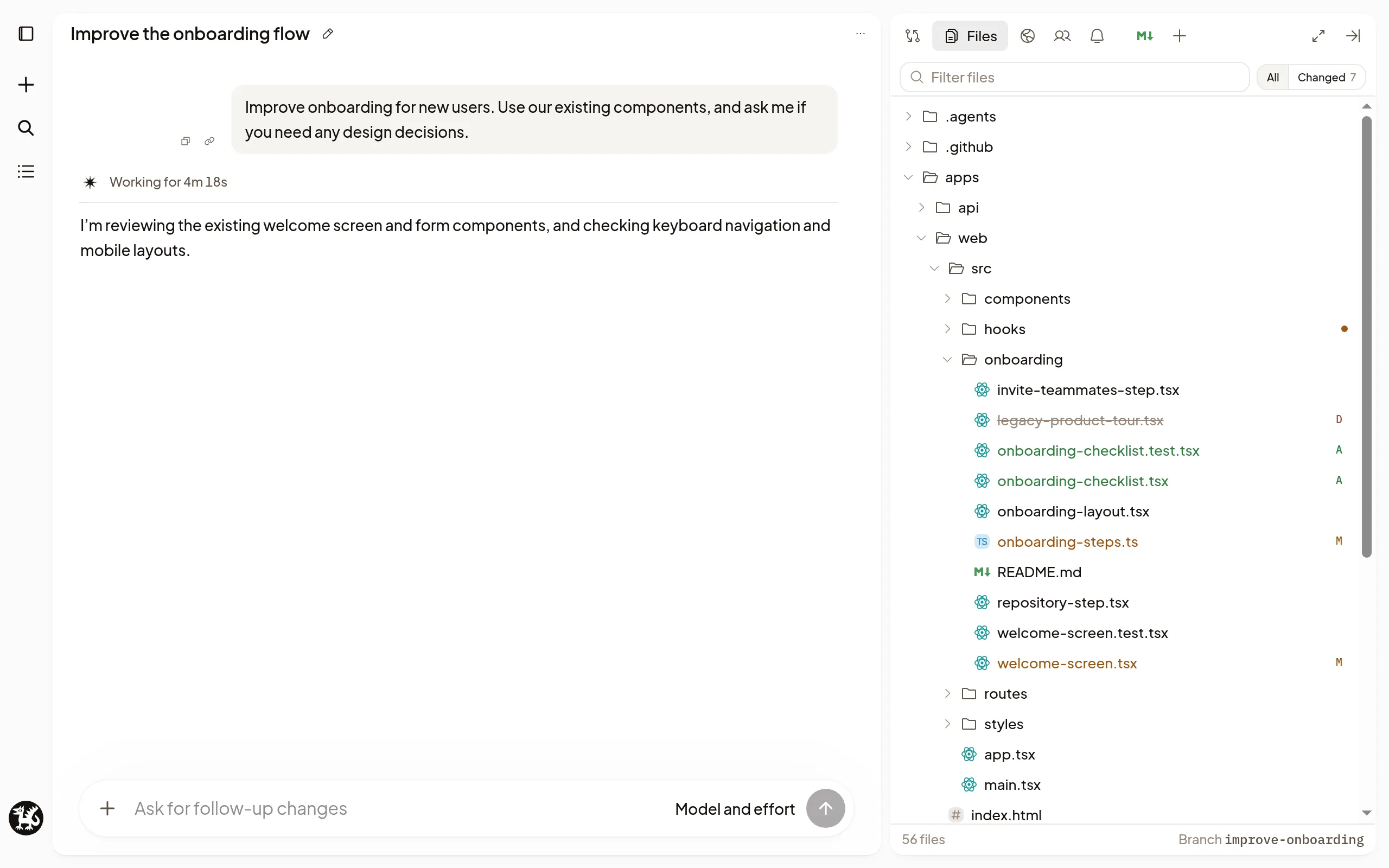
## Browse and open files
Select **Files** in the Session's right sidebar.
- **All** shows the whole checkout; **Changed** shows only the files in the
current [Changes](/docs/review-changes) comparison.
- Type in **Filter files** to find a file by name or path.
- Select a file to open it in a tab. It updates as the agent edits it.
Reloading or returning to a Session restores its open file tabs, selected tab,
source or preview choice, and reading positions in this browser. Each browser
tab keeps its own place. Signing out or clearing browser data removes it.
## Go to a file by name
Press ⌘+P (Ctrl+P on Windows and
Linux), or select **Go to file**: on a computer it's under **+** in the
sidebar's tab row, and on a phone it's in the tab row. Before you type, it
suggests files **Changed on this branch**, **Recently opened** and **Linked in
this Session**. Type part of a name and press Enter to open it.
To point the agent at the file instead, press ⌘+Enter
(Ctrl+Enter). Polaris adds it to the message you're
writing without sending it.
## Open files from the transcript
When the agent names a file in its reply, select the name to open it. That
works for a link, a path such as `docs/plan.md`, and a file name written as
code, such as `package.json`. A file name opens the file with that name at the
top of the repository. A name with an extension, such as `checkout.ts`, also
opens the only file anywhere with that name. A path with a line, such as
`src/app.ts:40`, opens the file at that line and highlights it.
A file name that several folders share, with none at the top, stays plain text.
Use **Go to file** to pick the one you mean.
## Preview what's inside
File tabs show more than code:
- **Markdown** as a formatted document. Select **Show source** for the text.
- **CSV and TSV** files as tables.
- **Notebooks** with their saved outputs. Opening one doesn't run it.
- **Images, videos, PDFs and audio**, ready to view or play.
File tabs are read-only. To change a file, ask the agent, or edit it yourself in
a [terminal](/docs/terminal).
## Copy or download a file
Above an open file, **Copy path** copies its path, **Copy file contents**
copies its text, and **Download** saves it to your computer. **Wrap lines**
wraps long lines, here and in [Changes](/docs/review-changes).
## If it doesn't work
- **Machine is asleep:** Files, Go to file and the composer's `@` list keep
working from the Machine's last saved file list, in any tab or device, with
its age, such as "Machine is asleep · showing files from 12 min ago".
Polaris saves the list while the Machine is awake: when it wakes, when you
look at files and when a Turn ends. Searching it never wakes the Machine.
**Changed** keeps the last Changes. To open a file, select **Wake machine**,
and it opens when the Machine is ready.
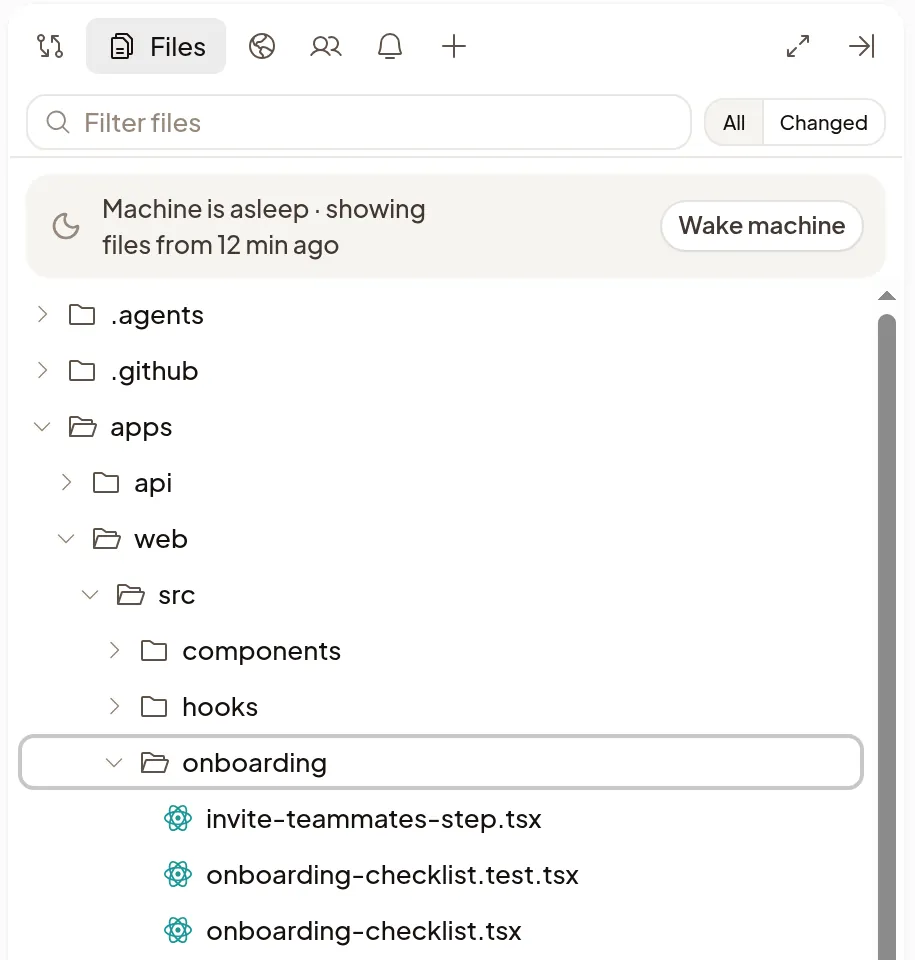
- Until a Machine's list is first saved, Files shows **Wake machine**
instead. After a Machine is replaced, its old list is hidden until the new
Machine saves one.
- In a very large repository the saved list can be incomplete, like the
awake list. Folders it leaves out can't be searched until the Machine
wakes.
- **A folder's files aren't listed:** Files, Go to file and the `@` list leave
out files your repository ignores, unless they're committed. In a Git
repository they also leave out the files inside a folder that is its own
repository, such as a submodule or an agent's worktree.
- **File is too large to show:** text files larger than 256 KB don't display.
Select **Download** to read it on your computer.
- **Preview unavailable:** your browser can't display this file. Select
**Download** instead.
- **Can't open files outside the project folder:** ask the agent to copy the
file into the project, or to share it with you.